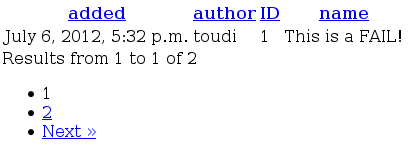
Quickstart
So you have set of data you want to display. You would like to django handle sorting and paging automatically. Let’s face it: it ain’t gonna happen. However, with a little of your time and patience, we can make things easier.
In the following tutorial, we are going to create a grid of fails. Well, at least i’m going to.
Let’s create a django model to display data from:
from django.db import models
from django.contrib.auth.models import User


class Fail(models.Model):
    name   = models.CharField(max_length=32)
    added  = models.DateTimeField(auto_now_add=True)
    author = models.ForeignKey(User)
Step 1: Create a grid
from grid import Grid
from fail.models import Fail


class FailsGrid(Grid):
  class Meta:
    model = Fail
Step 2: Display a grid
In order to display a grid, you need to include it’s template inside of yours. This would be an example of such action:
from fail.grids import FailsGrid
def my_view(request):
  grid = FailsGrid(request)

  return render_to_response(
    request,
    {
      'grid': grid
    }
  )
Let’s not forget the template part:
{% include "grid/object_list.html" %}
That’s it! You’ve completed the tutorial. You can now start to read deeper...
Pics or it didn’t happen!